
Before changing DNS
First make sure you have the correct nameservers. HOST.NC may provide them in the client area, in a support ticket or during service setup.
If the domain already runs a website or email service, do not change DNS blindly. A wrong value can make the website unavailable or stop email delivery.
1. Nameservers or DNS zone
Changing nameservers tells the domain which provider manages its DNS zone. This is what you do when entering values such as ns1.host.nc and ns2.host.nc.
Changing a DNS zone means editing technical records such as A, CNAME, MX or TXT. This guide is about changing nameservers at domaine.nc.
2. Steps in domaine.nc
- Sign in to your domaine.nc account.
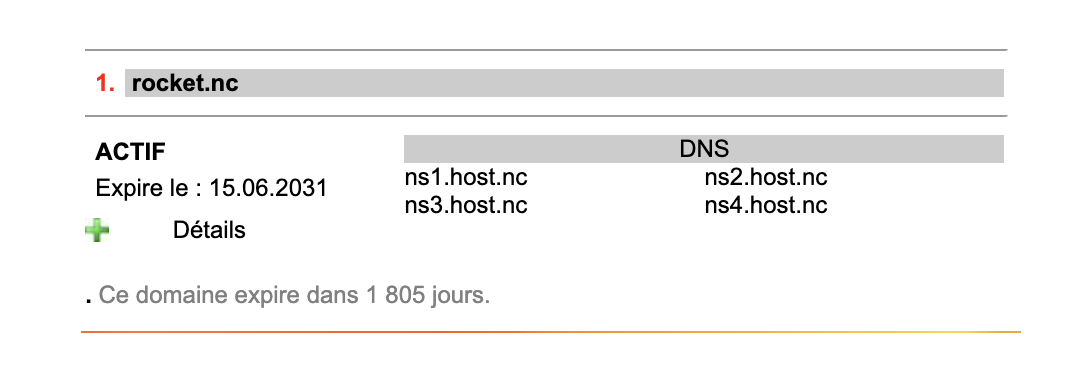
- Select the relevant domain name.
- Click the green + button next to Détails.
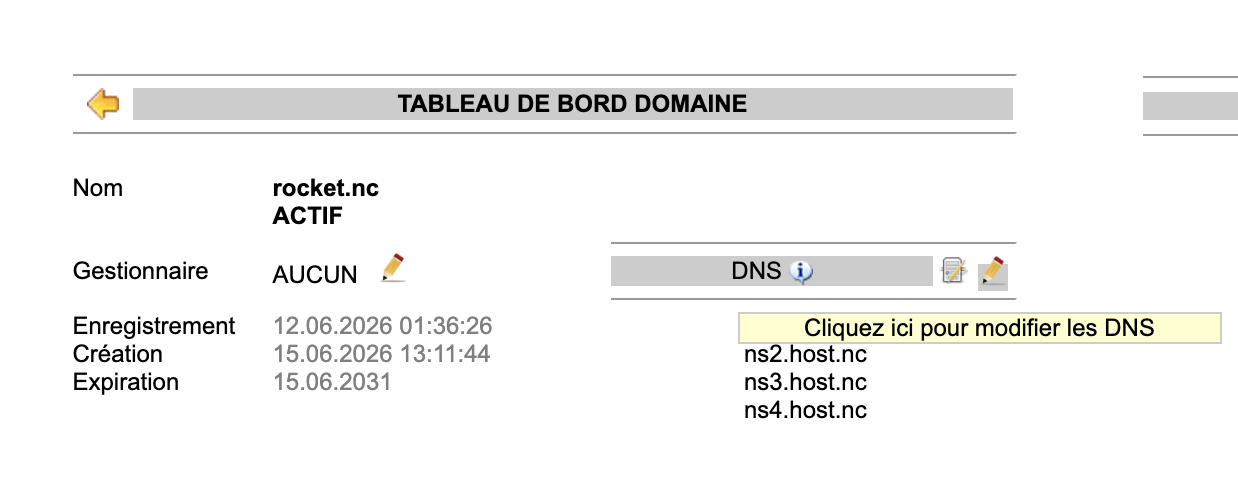
- In the domain dashboard, find the DNS block.
- Click the pencil icon on the right of the DNS title.
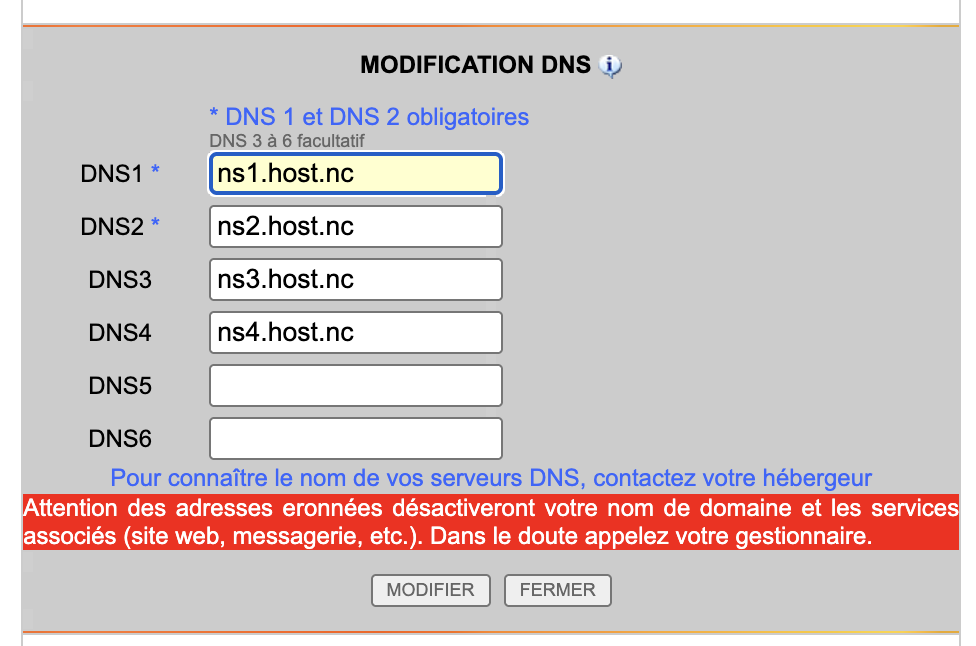
- Fill the DNS fields with the servers provided by HOST.NC.
- Validate the change and allow time for DNS propagation.
Example with domaine.nc
3. HOST.NC DNS values
If HOST.NC asks you to use its nameservers, enter:
- DNS1: ns1.host.nc
- DNS2: ns2.host.nc
- DNS3: ns3.host.nc
- DNS4: ns4.host.nc
4. DNS propagation
After validation, the change may not be visible everywhere immediately. DNS caches can keep the previous configuration for a while.
Allow from a few minutes to several hours depending on networks and providers.
5. Mistakes to avoid
Changing DNS before preparing email
If email depended on the previous DNS zone, delivery may stop if the new MX records are not ready.
Confusing registrar and hosting provider
domaine.nc manages the domain registration. The website, hosting and email may be managed elsewhere, such as HOST.NC.
Entering an incomplete value
Use the full nameserver names, such as ns1.host.nc, without extra spaces or typos.
FAQ
Do I need to change DNS to use HOST.NC hosting?
Yes, if the domain is registered elsewhere and HOST.NC must manage the DNS zone or connect it to hosting.
Are DNS 3 and DNS 4 mandatory?
In domaine.nc, DNS 1 and DNS 2 are mandatory. DNS 3 to DNS 6 are optional.
Is the change immediate?
No. DNS propagation is required and may take from a few minutes to several hours.
What if I am unsure?
Open a HOST.NC support ticket before changing DNS, especially if the domain is already used for a website or email.
Need help connecting your domain?
HOST.NC can help verify nameservers, prepare DNS records and avoid interrupting your website or email.